The best models to run on an Apple M5 Max 128GB MacBook Pro
Three models on my 128GB M5 Max: Qwen3.8-Flash-Next for speed, Qwen3.8-27B at 8-bit for a smaller memory footprint, and DeepSeek-V4.1-Flash streamed from SSD. Local speed tests included.
I recently bought an M5 Max MacBook Pro with 128 GB of RAM to run local AI models on the go. So far, I’ve run Qwen3.8-Flash-Next, a 125B-parameter model with 6B active parameters per token, at 72–86 tokens/second; Qwen3.8-27B at 38–45 tokens/second; and DeepSeek-V4.1-Flash at 7–8 tokens/second, streaming from SSD because it doesn’t fit in memory. This article covers these three models, the engines I used, and how to run them.
I still find this a little ridiculous. A few years ago I was trying ChatGPT in a browser for the first time. Now I can put a 125B-parameter model on a laptop, disconnect from the internet, and have it write code at over 70 tokens a second. I still use cloud models, but I wouldn’t have expected to have this much running in my backpack so soon.
There’s also been a wave of new inference engines for Apple Silicon. It feels more fragmented than the CUDA ecosystem right now: plenty of new projects, each supporting different models and making its own speed claims. For this setup I used MTPLX for the two Qwens and antirez’s ds4 for DeepSeek.
My configuration has an 18-core CPU, 40-core GPU and 128 GB of unified memory, with 614 GB/s of memory bandwidth according to Apple. Generating each token involves reading model weights, so fast memory helps. DeepSeek is a different story: much of it lives on the SSD, which is far slower than RAM.
The two Qwens I’d start with
Qwen3.8-Flash-Next Optimized Speed is a 125B mixture-of-experts model with 6B active parameters per token. This pack uses mostly 4-bit weights, with 8-bit attention projections. The download is about 115 GB, but its n-gram table streams from SSD instead of staying resident. The model card reports an 87 GiB serving peak, which makes this a reasonable fit for 128 GB, provided you leave room for context and macOS.
Qwen3.8-27B Optimized Quality is the less memory-hungry option: a 29.4 GB download, 8-bit weight matrices, and a model-card peak of about 33 GB. It leaves much more room for the rest of my applications. “Quality” here means less quantization loss relative to the original 27B checkpoint, not that I’ve established it answers better than Flash-Next.
Both run through MTPLX, an Apple Silicon engine built on MLX with native multi-token prediction. It drafts several tokens and verifies them together, the same general idea as speculative decoding. Both packs advertise a 262,144-token context window; that isn’t a promise that filling it will be fast.
How good are they?
For an independent coding comparison, Artificial Analysis reports these Terminal-Bench 4.0 scores, which measure agents working through tasks in a terminal:
| Model tested by Artificial Analysis | Terminal-Bench 4.0 |
|---|---|
| Qwen3.8-Flash-Next | 25.3% |
| Qwen3.8 27B (xhigh) | 5.6% |
| DeepSeek V4.1 Flash (max) | 26.8% |
On this test, Flash-Next is much stronger than 27B and close to DeepSeek. Combined with the local speeds below, that’s why I’d start with Flash-Next for coding. The 27B’s advantage here is its smaller memory footprint. These are scores on one demanding agent benchmark, not a verdict on every kind of task. Artificial Analysis doesn’t currently list a complete Intelligence Index v5.0 score for all three, so I’m not mixing scores from different index versions.
These benchmarks also aren’t measurements of my quantized copies. Quantization loses precision: the 8-bit 27B should stay close to its original checkpoint, while the 4-bit Flash-Next and mixed-precision DeepSeek make a bigger compromise to fit on local hardware. How much that affects answers depends on the task. I haven’t rerun these quality benchmarks locally, so treat the published scores as a guide to the underlying models, not guaranteed scores for these downloads.
Local speed tests
These are results from my local server logs, not the model cards. The installed MTPLX version is 2.12.2. Each Qwen request hit a 2,048-token output cap, including reasoning tokens, on three similar tasks:
| Task | Flash-Next 4-bit | 27B 8-bit |
|---|---|---|
| Explain B-tree indexes | 85.8 tok/s | 43.5 tok/s |
| Implement a Python LRU cache with TTL | 83.1 tok/s | 45.3 tok/s |
| Design an offline-first notes app | 71.6 tok/s | 38.1 tok/s |
Those are the engine’s reported generation rates. Including prompt processing and request overhead, the ranges were 71–85 and 38–45 tok/s respectively. Prompts were short, 48–93 tokens depending on the model and task. This is a practical spot check, not a controlled quality evaluation or a long-context benchmark.
Watch them generate
I recorded all three writing a Python function to merge overlapping intervals. Each ran on its own, with thinking off, temperature 0 and a 512-token output cap. The animation replays the text as it arrived from the local API, at normal speed.
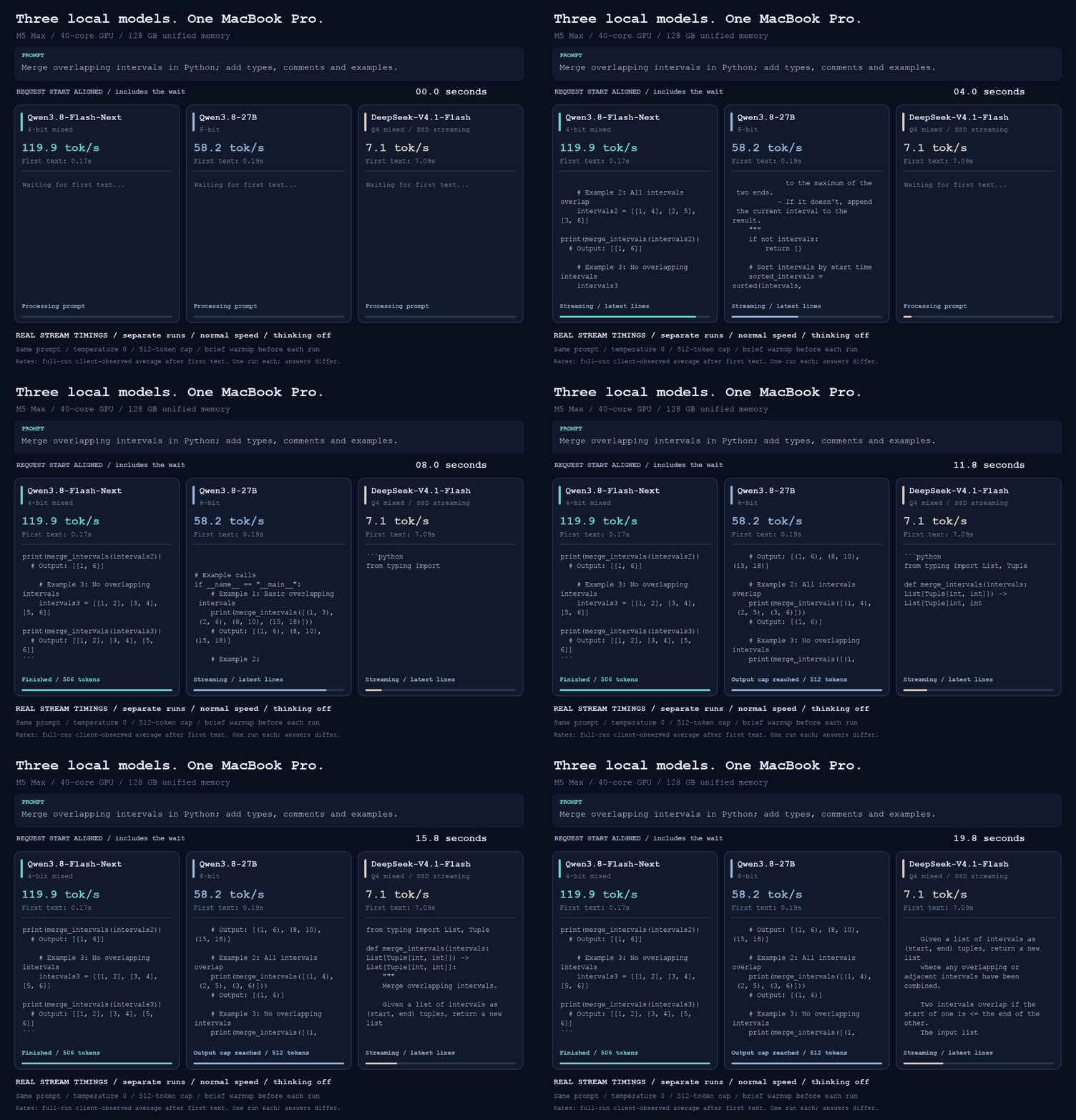
Flash-Next finished in 4.4 seconds. The 27B hit its output cap in 9.1 seconds. DeepSeek started writing after 7.1 seconds and finished in 75.4 seconds; the GIF shows the first 20 seconds. Their generation rates on this prompt were about 120, 58 and 7 tokens/sec respectively. Thinking was off for this recording, unlike the longer Qwen tests above, and these rates were measured from the client-side stream.
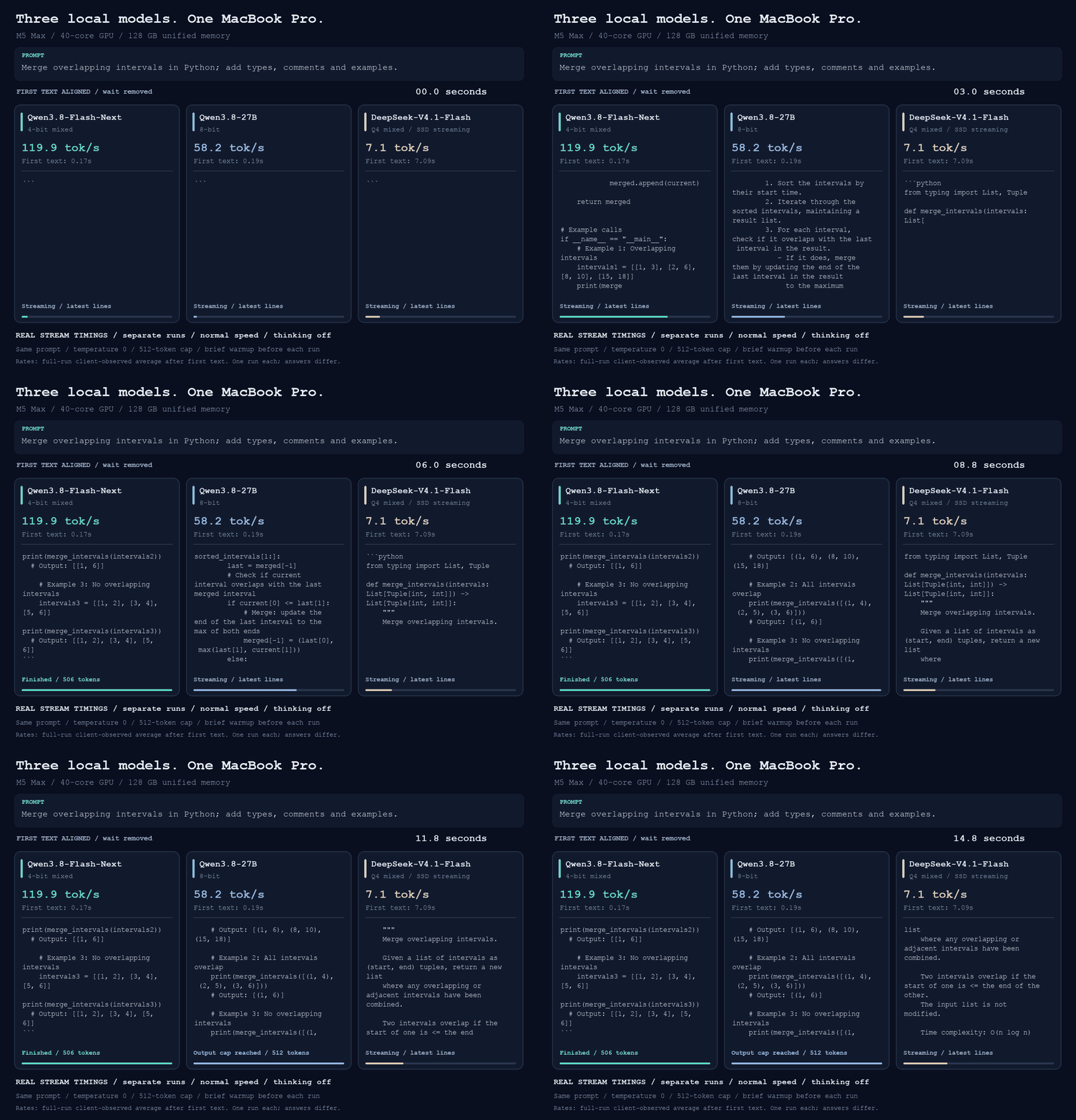
Compare generation with the initial wait removed (click to expand)
Here I’ve lined up the first text from each model, so you can compare how quickly the answers grow once generation starts. This clip runs for 15 seconds at normal speed.
DeepSeek: possible, but bring patience
I also have DeepSeek-V4.1-Flash Q4 running through antirez’s ds4. “Q4” doesn’t mean every weight is 4-bit. According to the GGUF model card, this build uses Q4_K for the routed experts, Q8 for attention projections, shared experts and output weights, and F16/F32 for other tensors. The Engram tables stay in their original FP8 format. The separate Q2 build uses IQ2_XXS for routed gate/up experts and Q2_K for down experts, but that’s not the build I benchmarked here.
The Q4 GGUF is about 483 GiB: roughly 294 GiB of main weights plus 189 GiB of Engram tables. It doesn’t fit in 128 GB, so ds4 streams weights from SSD with an automatically sized expert cache, and reads Engram rows from disk as needed.
Separate 128-output-token tests measured 8.3 tok/s after a 39-token prompt and 7.1 tok/s after a 1,844-token prompt. Time to first token was roughly 6–7 seconds and 35 seconds respectively. A separate retrieval check correctly recalled a code buried in a 54,045-token prompt in 193 seconds total, with the server configured for 128K context. That doesn’t establish reliable retrieval across the full window.
I’m glad it runs, but Flash-Next is the one I’d start with for an interactive coding session.
Run it
Get the MTPLX Mac app or CLI, or build ds4 from source using its Apple Silicon installation guide. The Qwen model downloads are linked above; DeepSeek’s model download guide lists the supported GGUFs.
These are simplified foreground versions of my launch scripts. Run one model at a time and use Ctrl+C to stop it.
Start either Qwen with MTPLX (click to expand)
Install once, using Python 3.11 or newer:
1
2
3
mkdir -p ~/models
python3 -m venv ~/models/.mtplx-venv
~/models/.mtplx-venv/bin/pip install mtplx==2.12.2
Save as ~/models/start-qwen.sh. MTPLX downloads the selected pack on first use.
1
2
3
4
5
6
7
8
9
10
11
#!/bin/bash
set -euo pipefail

case "${1:-flash}" in
  flash) MODEL="Youssofal/Qwen3.8-Flash-Next-MTPLX-Optimized-Speed" ;;
  quality) MODEL="Youssofal/Qwen3.8-27B-MTPLX-Optimized-Quality" ;;
  *) echo "Usage: $0 [flash|quality]" >&2; exit 1 ;;
esac

exec "$HOME/models/.mtplx-venv/bin/mtplx" serve \
  --model "$MODEL" --host 127.0.0.1 --port 8000
Run bash ~/models/start-qwen.sh flash or bash ~/models/start-qwen.sh quality.
Start DeepSeek-V4.1-Flash Q4 with ds4 (click to expand)
Install Apple’s Command Line Tools and the Hugging Face CLI first. Build and download once; allow space for the download parts as well as the assembled 483 GiB GGUF:
1
2
3
4
5
6
7
8
mkdir -p ~/models
cd ~/models
git clone https://github.com/antirez/ds4.git
cd ds4
# Revision used for my local tests:
git checkout c97964b8aa77034a8e17afb10ca7a686c40ab511
make -j12
./download_model.sh ds41f-q4
Save as ~/models/start-deepseek.sh. This keeps my 128K context allocation and 8 GiB disk KV-cache budget; it does not load the entire model into RAM.
1
2
3
4
5
6
7
8
9
10
11
12
#!/bin/bash
set -euo pipefail
ROOT="$HOME/models"
KV="$ROOT/deepseek-v4.1-flash/cache/kv"
mkdir -p "$KV"
chmod 700 "$KV"

exec "$ROOT/ds4/ds4-server" --chdir "$ROOT/ds4" \
  -m "$ROOT/ds4/gguf/DeepSeek-V4.1-Flash-Q4.gguf" \
  --ssd-streaming --ctx 131072 \
  --host 127.0.0.1 --port 8001 \
  --kv-disk-dir "$KV" --kv-disk-space-mb 8192
Run bash ~/models/start-deepseek.sh. The KV cache contains conversation data, so keep it private. Stop the server before deleting it.
The OpenAI-compatible API is at http://127.0.0.1:8000/v1 for MTPLX or http://127.0.0.1:8001/v1 for ds4, so I can connect either to my existing agent setup. I’d use Flash-Next when the laptop is mainly serving the model, and 27B when I want to keep working without giving most of the machine’s memory to inference.